Your cookbook
How to organise recipe screenshots into a usable cookbook
Find the recipe behind your screenshots. Learn what to capture, how to scan it in Zuppi and what to check before saving.
In this guide
Start with five recipes you want to make
A camera roll can hold hundreds of food ideas without becoming a useful recipe collection. Rather than sorting everything at once, choose five screenshots for meals you could realistically cook soon. This gives you a small cookbook you will use and a repeatable way to handle the rest.
Group screenshots of the same recipe together. An ingredient list, a second image of instructions and a screenshot of the creator’s name may all belong to one dish. Do not lose that relationship while you tidy up.
Check that the screenshot contains a recipe
A photograph of the finished dish gives an importer very little to work with. You need legible text: a title, ingredients with quantities and the method. Where possible, save the original recipe webpage instead of trying to recover text from a tiny social screenshot.
For a photographed page or handwritten card, keep the camera square to the page, use even lighting and avoid cutting off the ends of lines. Handwriting and small fractions may need manual correction.
- Expand truncated captions before taking the screenshot.
- Keep units, serving counts and oven settings visible.
- Avoid overlapping app controls that cover recipe text.
- Record the creator or source URL separately if it is not in the image.
Scan the recipe in Zuppi
In the current Android alpha, open the add-recipe menu and choose Scan a recipe. Choose photo selects an existing image; Take photo starts a new capture. Zuppi reads the text and prepares it for review.
For a recipe spread across several screenshots, work through the images in order and check the complete ingredient list and method. The Android Choose photo flow selects one image at a time; do not assume it will automatically stitch several screenshots into one recipe. Add missing details during review or edit the saved recipe.
- Choose a clear image containing recipe text.
- Compare the recognised ingredients with the image, especially quantities and fractions.
- Check the full method and add any missing steps.
- Save the recipe with a useful title and its source details.
Four small details to compare with the screenshot
Keep the original image beside you as you review the recipe. Small details like these are easy to miss.
| In the original | What to preserve | Why it matters |
|---|---|---|
| ½ tsp salt | The fraction and tsp unit | Losing the fraction changes the amount. |
| 400 g tin, drained | The amount and drained instruction | The preparation belongs with the ingredient. |
| Juice of 1 lemon, divided | The divided instruction | The recipe may use it at different stages. |
| Steps continued on image 2 | The remaining instructions | A successful scan of one image does not complete the method. |
Use names you will remember at dinner time
“Crispy chickpea wraps” is easier to find than “Screenshot 2026-10-06”. A descriptive title should name the main ingredient and the dish. You can keep the creator’s own title when it already does this well.
Use favourites for recipes you want to return to. Avoid building so many categories that saving the next recipe becomes a filing project. Searchable names and a small set of favourites are a useful starting point.
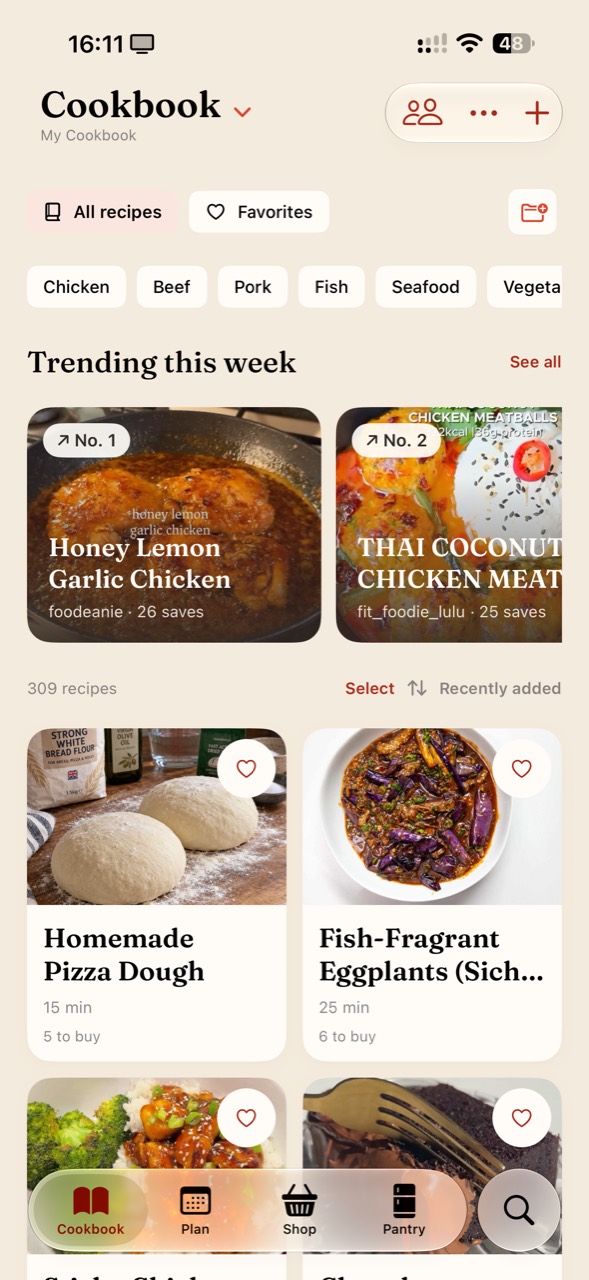
In the current iPhone screenshot, Favorites sits beside All recipes, and recipe cards keep a readable title under the picture. The Cookbook search button is at the bottom right. Start with names and favourites you can recognise before adding more folders.
Keep the original until the recipe is checked
Do not delete the source image just because an import completed. First confirm that the recipe was saved and that you can reopen it. Compare the details while the original is still available.
A personal cookbook also benefits from attribution. Keep a link to the creator’s page where possible, and do not treat importing a recipe as permission to republish someone else’s photographs or writing.
Have a question, or an idea that would make this guide more useful in your kitchen? Get in touch. We’d love to hear from you.