Get ready to cook
How to turn saved recipes into a shopping list
Build a grocery list from your saved recipes in Zuppi, check servings and quantities, and avoid buying ingredients you already have.
In this guide
Choose the meals you will actually cook
Start with two or three dinners instead of adding your entire cookbook. Check which evenings need a quick meal and which ingredients can sensibly be used in more than one dish. Leave room for a change of plan.
Open each saved recipe before adding it. A recipe with a missing ingredient amount will produce an incomplete shopping list. Fix the recipe first so the next shopping list benefits from the correction too.
Add the ingredients in Zuppi
In the Android alpha, open a saved recipe and choose Add to shopping list. Zuppi adds ingredients from that recipe to Shopping. Check the serving count before using this action; the Android recipe view uses the selected servings when adding quantities.
- Open the recipe you want to cook and check its ingredients.
- Set the servings you need before adding ingredients.
- Choose Add to shopping list, then repeat for your other selected recipes.
- Open Shopping and review the combined list before leaving for the shop.
Review amounts before thinking about pack sizes
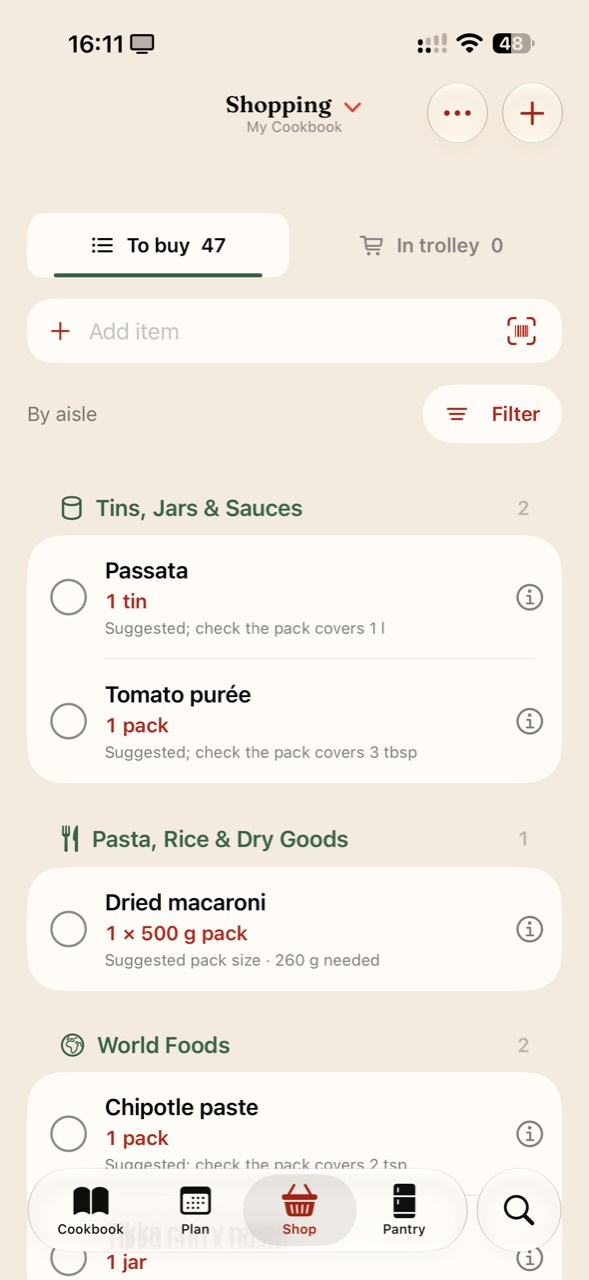
The current iPhone shopping screenshot shows dried macaroni with “260 g needed” and a suggested “1 × 500 g pack”. The recipe amount is 260 g; the suggested purchase is a pack that covers it. That leaves 240 g from a full pack. It does not mean the recipe needs 500 g.
The same screen shows passata as “1 tin” with “Suggested; check the pack covers 1 l”. Treat that as a prompt to check the actual product. If a tin contains less than 1 litre, one tin does not cover the requirement. Pack suggestions are not a substitute for comparing the needed amount with the label.
Keep unlike ingredients separate. Fresh and tinned tomatoes may have different roles in the recipe, and spoonfuls cannot simply be added to grams without an appropriate conversion.
| Shown in the app | What it means | What to check in the shop |
|---|---|---|
| Dried macaroni: 260 g needed | The amount required by the recipes | A 500 g pack covers it if you have none already. |
| Passata: check the pack covers 1 l | The list needs a total volume of 1 litre | Buy enough containers to cover that volume. |
| Tomato purée: check the pack covers 3 tbsp | A recipe quantity rather than a pack size | Check that the tube or tin contains enough. |
Compare the list with what you already have
Check the cupboard, fridge and freezer before shopping. Cross off or adjust items you already have in sufficient quantities. Keep a note of ingredients that are nearly finished rather than assuming every pantry staple is available.
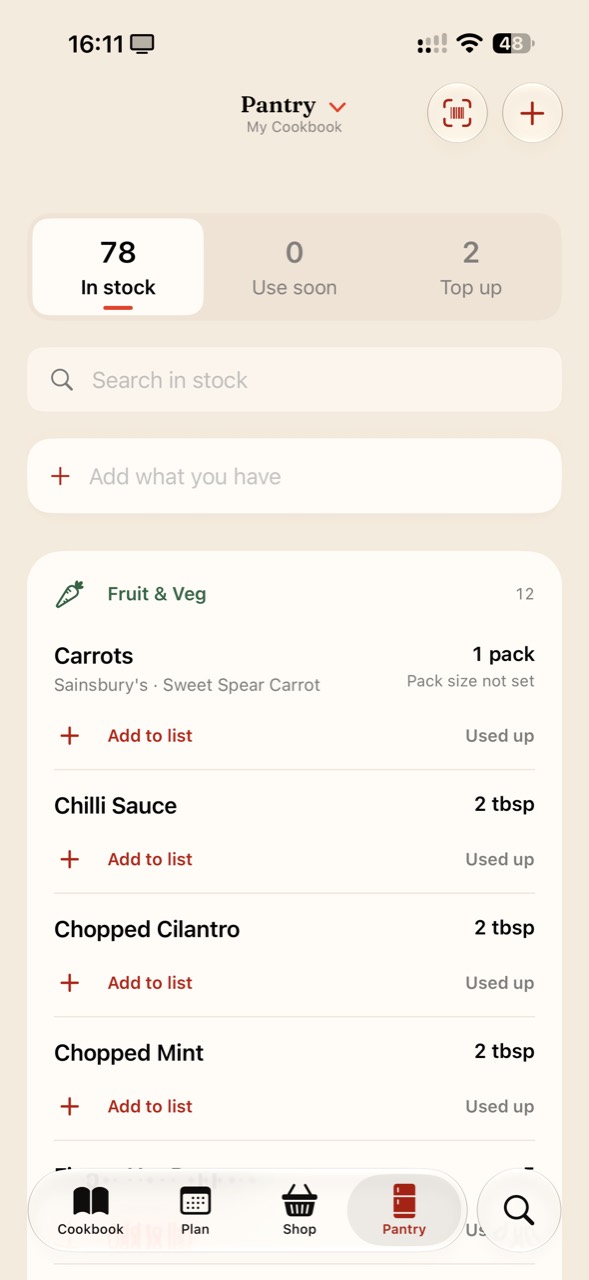
Zuppi includes a pantry, but an inventory is only as useful as the information you keep in it. Review what is actually on the shelf; do not assume the app has automatically deducted everything used while cooking.
The iPhone Pantry screenshot below separates In stock, Use soon and Top up. Each listed ingredient includes Add to list and Used up controls. The carrot entry also says “Pack size not set”: a recorded pack is not proof of a known weight. Check the actual pack before deciding whether it covers a recipe.
Add the things recipes do not include
Breakfasts, snacks, drinks and household essentials will not necessarily appear in a dinner recipe list. Add them separately so you can make one useful trip.
After shopping, check purchased items in the list. In the current Android build, Finish shopping can move checked items to Pantry; Remove checked clears them without updating Pantry. Choose the action that matches how you want to maintain your inventory.
Have a question, or an idea that would make this guide more useful in your kitchen? Get in touch. We’d love to hear from you.