Recipes together
How to share recipes with friends and your household in Zuppi
Choose between friends’ shared recipes, your own saved copy and a shared Home cookbook, meal plan, shopping list and pantry.
6 min read
Recipes are better together
Find something good in a friend’s recipes. Keep a copy for yourself. Bring it into your shared Home when it is time to plan, shop and cook together.
See testing availability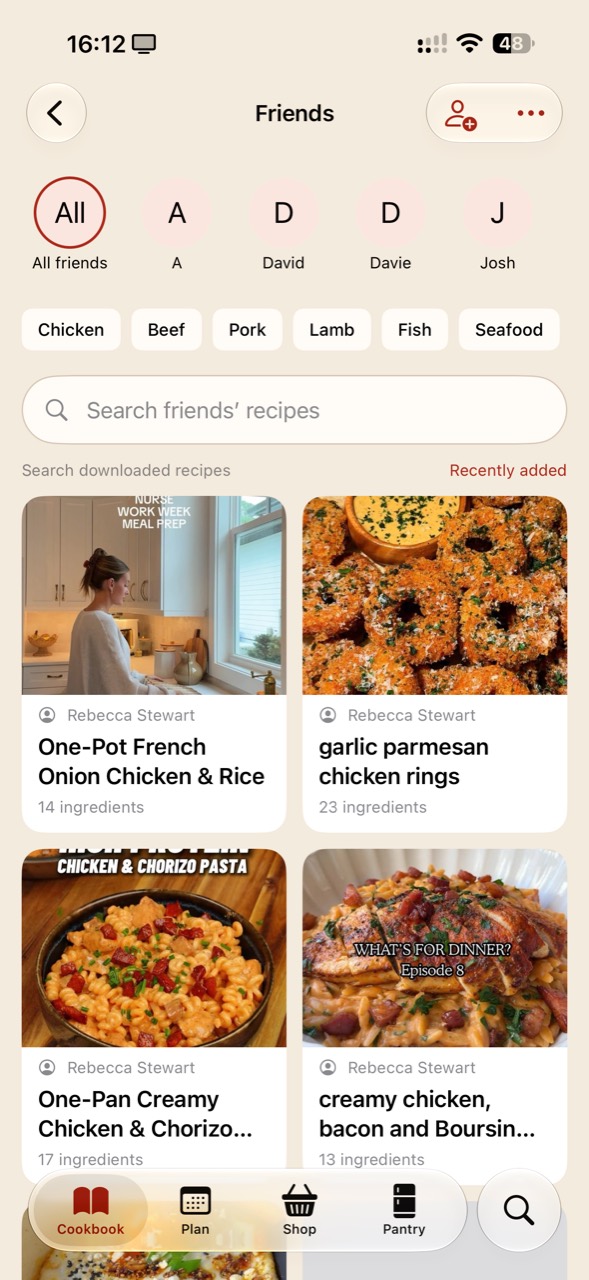
Browse the recipes your accepted friends share with you. Use the All friends view or choose a person, then search the recipes loaded on your device. The iPhone screenshot shows friend filters and ingredient categories alongside the recipe cards.
Save an independent copy to your cookbook when you want to keep or adapt a recipe. Your version and your friend’s original remain separate.
A Home combines shared recipes, a meal plan, shopping and pantry information for invited household members using their own accounts. Switch into your Home to work on that household’s cooking.
Bring a recipe across from your personal cookbook when it belongs on the household menu. Review the servings, coordinate ingredients and keep useful notes with the shared recipe. Editing access depends on the Home’s current entitlement.
A recipe shared with friends, an independent copy in My Cookbook and a household recipe have different audiences. Check the active space before editing or sharing.
Personal notes, favourites and cooking history stay private in friends-library sharing. Individual personal recipes can be hidden from friends; copies already saved by another person are not recalled when sharing stops.
No. Friends lets you browse recipes shared by accepted friends. Home is a separate invitation for coordinating a household’s cookbook, plan, shopping and pantry.
No. Save to My Cookbook creates an independent copy. Changes to one copy do not automatically update the other.
Home members join with their own Zuppi accounts. Use the Home invitation flow and switch into the shared Home to work together.
Zuppi is in testing, with Android alpha access open. Check the current availability on the homepage. Features, Home entitlements and screens may change before public release.