Recipes together
How to share recipes with friends and your household in Zuppi
Choose between friends’ shared recipes, your own saved copy and a shared Home cookbook, meal plan, shopping list and pantry.
In this guide
Choose the space that matches what you want to do
Sending a recipe, browsing a friend’s cookbook and planning dinner together are different jobs. In Zuppi, Friends helps you find shared recipes, My Cookbook holds your personal collection, and Home brings household cooking into a shared space.
| Your aim | Use | What to remember |
|---|---|---|
| Find the recipe a friend saved | Friends | You see recipes they share with accepted friends. |
| Keep a recipe and make your own changes | Save to My Cookbook | Your saved copy is independent of their original. |
| Plan and shop together | Your shared Home | Household members work with shared recipes, plans, shopping and pantry data. |
Find a recipe in a friend’s collection
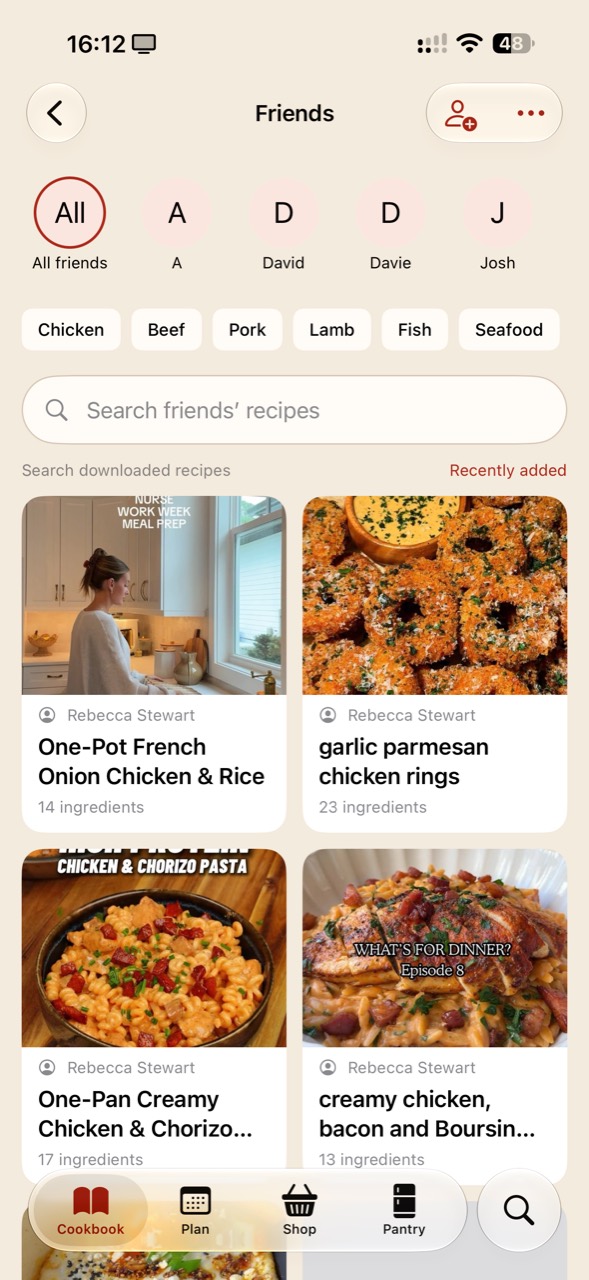
After a friendship is accepted and library sharing is enabled, shared recipes appear in Friends. The current iPhone screen below has an All friends view, individual friend filters, ingredient-category chips and Search friends’ recipes. It is useful when you remember who saved a dish but not its exact title.
The screen labels its search as “Search downloaded recipes”. If you cannot find a recipe, check whether more recipes need loading or whether the friend still shares it. A search result is not proof that you have searched every recipe in their account.
In the Android alpha, Friends & Home is available from More. Invite a friend starts the invitation flow. The invitation must be accepted; sending it does not automatically give access.
Save your own copy before adapting a friend’s recipe
Open a shared recipe and save an independent copy: the Android action is Save to My Cookbook, while the iPhone recipe view uses Save to my recipes. That is useful for a version with your preferred spice level or notes for your own kitchen. Your edits to that copy do not rewrite your friend’s original.
Do not expect later changes to the original to flow into an independent saved copy. Keep the original source details so you can return to the creator’s instructions when you need to check something.
Set up a Home for the people you cook with
A shared Home brings a cookbook, meal plan, shopping list and pantry together. It is for coordinating a household, while Friends lets you browse recipes beyond that household. Home access and editing depend on the current testing build and the host’s entitlement.
- In the Android alpha, open More, then Friends & Home.
- If you do not already have a Home, enter a name and choose Create Home.
- Use the Home’s Invite action and let the other person accept with their own Zuppi account.
- Switch from My Cookbook to your named Home before adding household recipes or changing its plan, shopping list or pantry.
- For a recipe already in your personal cookbook, use Copy to shared Home from its menu when that action is available.
Start with one dinner together
Choose one recipe you both want to cook. Put a copy in Home and agree on the servings. Add it to the household plan, then review the shopping list and what is already in the pantry. Check that both people have selected the same Home.
Let one person shop and the other check the household list on their own device. Confirm that changes have synced before relying on them. If a connection or account error is shown, resolve it before assuming everyone has the latest version.
After cooking, add useful household notes to the shared recipe. Keep personal experiments in your own cookbook if you do not want to change the version the household uses.
Know who can see each version
The Android setting Share my library with friends covers current and future personal recipes, with individual recipes hidden through their menus. Personal notes, favourites and cooking history stay private in that friends-sharing flow. A Home copy has a separate household audience.
Stopping sharing does not recall independent copies someone already saved. Decide what you want to share before enabling library sharing, and check the audience again when copying a recipe into Home. These distinctions are more useful than treating every share action as the same thing.
Can I use Friends without joining someone’s Home?
Yes. Friends and Home serve different purposes. You can browse an accepted friend’s shared recipes without joining their household. A Home invitation is a separate action.
Zuppi is in testing. The screenshot shows the current iPhone beta; the labelled setup steps describe Android. Check the homepage for current testing availability. This guide does not promise identical screens or subscription terms across builds.
Have a question, or an idea that would make this guide more useful in your kitchen? Get in touch. We’d love to hear from you.